
直接上图
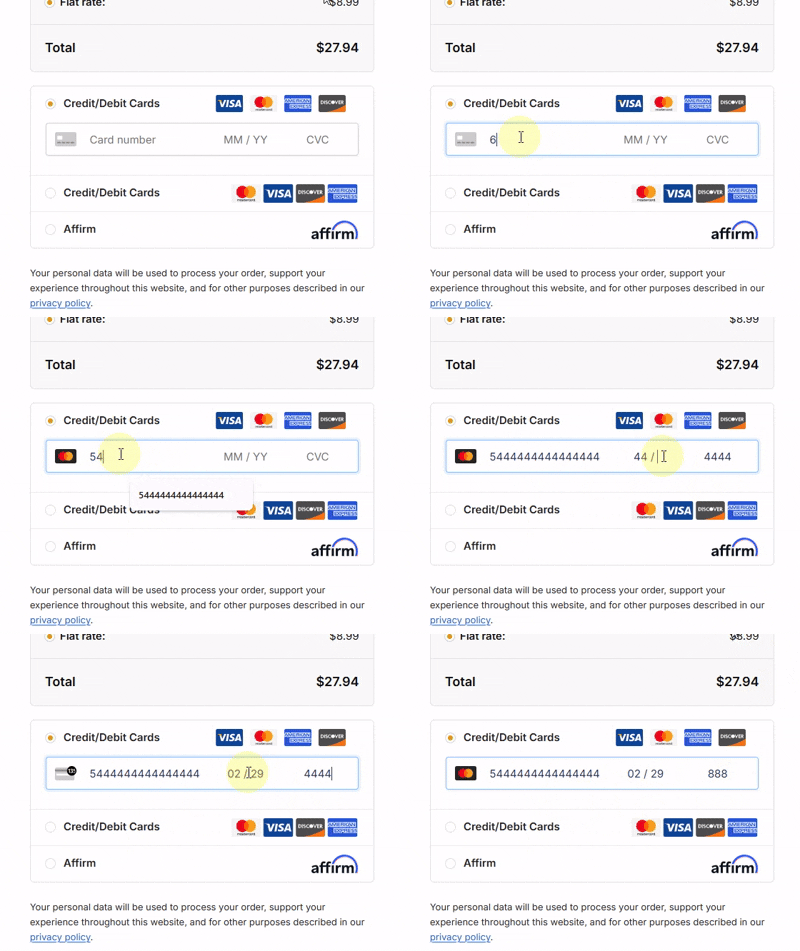
部分代码:
<div class="group-item-body payment__body CreditCard has_content" id="card-info" style="display:block">
    <div class="stripe-elements-field" id="stripe-container">
        <div class="stripe-card-icons">
            <img id="ico-default" src="<?php echo YOU_PLUGIN_URL;?>/static/images/num.svg" class="active">
            <img id="ico-visa" src="<?php echo YOU_PLUGIN_URL;?>/static/images/visa.svg">
            <img id="ico-master" src="<?php echo YOU_PLUGIN_URL;?>/static/images/mastercard.svg">
            <img id="ico-amex" src="<?php echo YOU_PLUGIN_URL;?>/static/images/amex.svg">
            <img id="ico-cvc" src="<?php echo YOU_PLUGIN_URL;?>/static/images/cvc.svg">
        </div>

        <input id="Test-card-number" name="Test_number" type="tel" maxlength="16" autocomplete="cc-number" placeholder="Card number" class="se-input" oninput="detectCard(this)" autocorrect="no" autocapitalize="no" spellcheck="no" type="tel" oninput="dd('e');" onkeyup="value=value.replace(/[^\d]/g,'')" maxlength="16" class="ixun_input">
        <input id="Test-card-expiry" name="Test_expiry" type="tel" maxlength="7" placeholder="MM / YY" class="se-input" oninput="formatExp(this)">
        <input id="Test-card-cvc" name="Test_cvc" type="tel" maxlength="4" placeholder="CVC" class="se-input" onfocus="toggleCvcIcon(true)" onblur="toggleCvcIcon(false)">
    </div>
</div>

<div id="Test-error" style="width: 100%; text-align: center; color: #eb1c26;"></div>

<div id="Test-form-fields" style="display: block; width: 100%;">
    </div>

<div id="cvv-load" style="display: none; width: 100%; height: 200px; flex-direction: column; align-items: center; justify-content: center; clear: both;">
    <img src="<?php echo YOU_PLUGIN_URL;?>/static/images/loading-icon-transparent-background-12.gif"
         style="width: 120px; height: auto; display: block; margin: 0 auto; background: none;">
</div>
部分CSS
<style>
/* 核心容器:解决自适应和居中 */
.test-stripe-wrapper {
    display: flex !important;
    align-items: center !important;
    background-color: #ffffff !important;
    border: 1px solid #ced4da !important;
    border-radius: 4px !important;
    padding: 0 10px !important; /* 这里控制整体内边距 */
    height: 45px !important;
    width: 100% !important;
    box-sizing: border-box !important;
    margin: 10px auto !important;
}

/* 图标容器:固定宽度 */
.test-icon-container {
    width: 32px;
    display: flex;
    align-items: center;
    justify-content: center;
    margin-right: 8px;
}

.test-icon-container img {
    display: none;
    height: 20px;
    width: auto;
}

.test-icon-container img.active {
    display: block !important;
}

/* 输入框样式:强制去掉默认边框和填充干扰 */
.se-input {
    border: none !important;
    outline: none !important;
    box-shadow: none !important;
    background: transparent !important;
    padding: 0 5px !important; /* 调整输入框之间的间距 */
    height: 100% !important;
    font-size: 15px !important;
    box-sizing: border-box !important;
}

/* 卡号占大头,其余占小头 */
#test-card-number {
    flex: 2 !important; /* 自动撑开剩余空间 */
    min-width: 100px;
}

#ixun-card-expiry {
    width: 75px !important;
    text-align: center;
}

#test-card-cvc {
    width: 55px !important;
    text-align: center;
}

/* 隐藏 WooCommerce 可能自带的干扰图标 */
.test-stripe-wrapper::after, .ixun-stripe-wrapper::before {
    content: none !important;
}
</style>
仅供参考,对应某条纹支付插件,美化作用,因为条纹有的自带的付款框太丑了,于是就有了以上代码
图标我是直接用的svg图片,相对简单点,如果直接用svg图标代码会增加文件大小,导致加载速度
评论留言